
Most "best AI website builder" lists have a tell. Twelve tools get ranked with no visible reason for the order, and the pricing was lifted from a blog post written two years ago.
So I did the tedious version instead. I wrote one build brief for a real type of small business, handed the identical prompt to six builders, and compared what came back out. The six are Framer, Wix, Webflow, Durable, Lovable, and Replit.
One finding reorganised this entire article. Two of these six are not website builders at all. They are software builders that happen to produce a website when you ask them for one, and the gap between those two categories is wider than any gap inside them. Choosing the wrong category will cost you more time than choosing the wrong tool inside the right one. That is why the section after the summary table is about categories rather than products, and why I would rather you read that part than skip to your favourite brand.
Every price below was read off the company’s own pricing page in August 2026.
The short version
| Builder | Best for | Cheapest paid plan | Free plan | Can you take the code? |
|---|---|---|---|---|
| Framer | Design-led marketing sites and portfolios | $10/mo (Basic, yearly) | Yes, Framer subdomain | No |
| Wix | Non-designers who want the whole business stack | $17/mo (Light, yearly) | Yes, with Wix branding | No |
| Webflow | Content-heavy sites built to scale | $15/mo (Basic, yearly) | Yes, 2 pages | Yes, HTML and CSS export |
| Durable | Service businesses that need a site today | $22/mo (Launch, yearly) | Yes, .durable.site | No |
| Lovable | Sites that are actually apps, with logins and data | $25/mo (Pro) | Yes, 5 credits a day | Yes, GitHub export |
| Replit | Technical builders who want the whole repo | $20/mo (Core, yearly) | Yes, 1 live project | Yes, full repo |
Prices are the published rates at the time of writing. Framer, Webflow, Durable, and Replit all quote a lower figure on yearly billing than monthly, which I have noted in each section below.
The one brief I gave all six builders
Comparing AI builders is meaningless unless the input is identical, because these tools respond enormously to prompt quality. A vague prompt makes every tool look mediocre. A detailed one flatters all of them. So I wrote a single brief with a real constraint set and pasted it, unedited, into all six.
Here is the exact prompt. Copy it if you want to run the same comparison yourself.
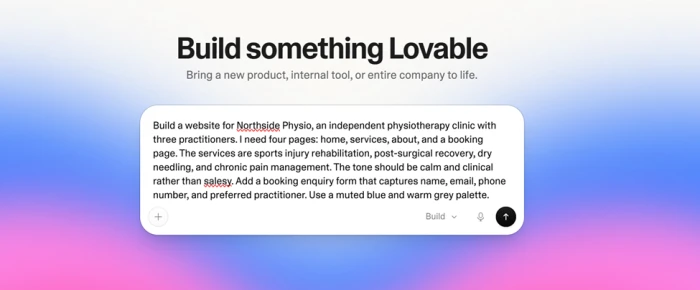
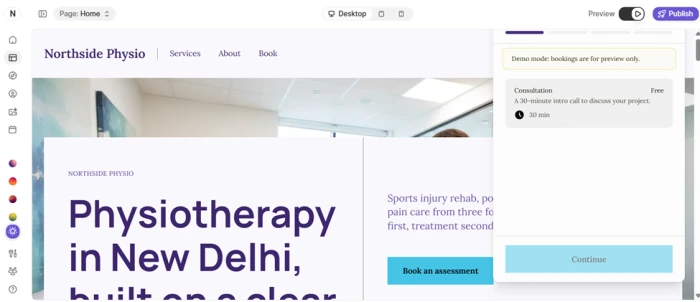
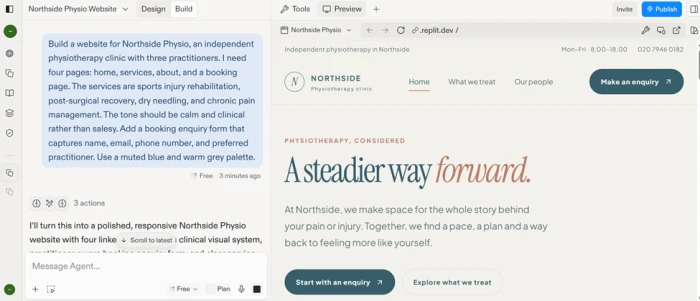
Build a website for Northside Physio, an independent physiotherapy clinic with three practitioners. I need four pages: home, services, about, and a booking page. The services are sports injury rehabilitation, post-surgical recovery, dry needling, and chronic pain management. The tone should be calm and clinical rather than salesy. Add a booking enquiry form that captures name, email, phone number, and preferred practitioner. Use a muted blue and warm grey palette.
A physiotherapy clinic is a deliberately ordinary choice. It has the features most small business sites actually need, and none of the flourishes that let a design tool show off.
I scored each tool on five things:
1. How long it took to reach a draft I would be willing to show a paying client.
2. Design quality with zero manual edits, straight out of the generator.
3. How quickly I could fix the things the AI got wrong.
4. Which SEO controls the tool actually exposes, rather than claims to have.
5. What I could take with me if I decided to leave.
That last criterion turned out to separate the six more cleanly than anything else, and I come back to it in the head-to-head section.
Three categories, and why the category matters more than the tool
By the third build it was obvious that I was not comparing six versions of the same product. I was comparing three different products, two of each.
• Design-first builders: Framer and Webflow. These are visual design tools that added AI generation on top. The output is a beautiful, static, content-driven site inside their own format.
• All-in-one business platforms: Wix and Durable. These optimise for a non-technical owner who wants the website plus the machinery around it, including hosting, bookings, invoicing, and a customer list.
• App builders: Lovable and Replit. These generate actual application code. You get a repository and a database, plus authentication if you ask for it.
One question sorts you into the right category faster than any feature comparison:
| Does your site need to remember anything about the person using it? |
If the answer is no, and your site is pages of content with a form at the end, you belong in the first two categories. Every AI app builder will happily generate that for you, and you will pay for capability you never touch while inheriting a codebase you now have to maintain.
If the answer is yes, because you need accounts, saved records, dashboards, or anything that persists between visits, then a design-first builder will fight you the whole way. My physiotherapy brief sat firmly in the first group, which is worth remembering when I get to Lovable and Replit later, because both of them overbuilt the assignment in ways that were impressive and unnecessary.
The 6 best AI website builders in 2026
The order below runs from the narrowest, most polished use case to the broadest and most technical. Each tool gets a different superlative on purpose, because the moment two tools compete for the same recommendation, one of them is redundant.
1. Framer: best for design-led marketing sites
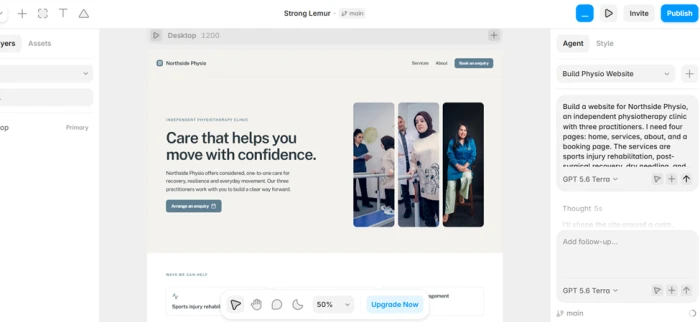
Framer generated the best-looking untouched draft of anything I tested. It was the only output I would have shown a client without apologising for it first.
The reason is structural. Framer was a serious design tool before it was an AI product, so the generator is producing layouts inside a system that already had opinions about type, spacing, motion, and hierarchy. The clinic homepage came back with a restrained palette and generous whitespace that matched the calm and clinical instruction in the brief rather than defaulting to the loud gradient look most generators reach for.
Where it costs you is capacity. Framer meters its AI features with credits, and its Basic plan caps you at 30 site pages and 2 CMS collections. For a four-page clinic site that is irrelevant. For a business that plans to publish two blog posts a week, it is a ceiling you will hit inside a year, and the jump to Pro triples your bill.
Pricing, verified on framer.com/pricing:
• Free: $0. Publish to a Framer subdomain with 1 GB bandwidth and 500 credits to try the agents. No custom domain.
• Basic: $10 a month on yearly billing. Free custom domain, 30 pages, 2 CMS collections, 1,000 CMS items, 50 GB bandwidth, 1,000 credits a month.
• Pro: $30 a month on yearly billing. 150 pages, 10 CMS collections, 100 GB bandwidth, staging, branching, 3,000 credits a month.
• Extra editor seats are $20 a month each. A content-only editor seat is $10.
What changed in 2026: Framer dropped editor seats to $20 across every plan and introduced the cheaper content-editor role, which makes it far more reasonable for agencies handing sites to clients than it was a year ago.
Skip Framer if you need a genuine content operation. That is Webflow’s job, and I compare the two directly further down.
2. Wix: best for non-designers who want the whole business stack
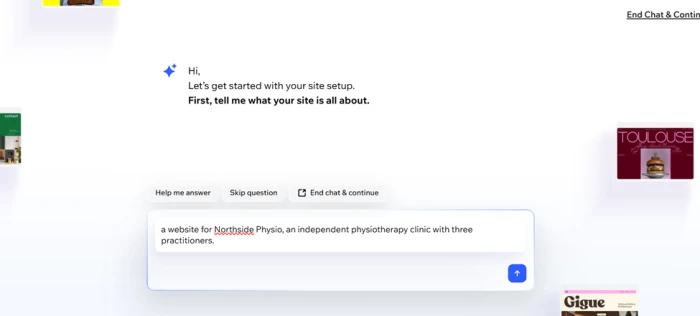
Wix produced the least interesting design of the six and the most complete business.
The generated site was competent and generic. What arrived alongside it was the part that matters for an actual clinic: a booking system, a place to take payments, an email marketing tool, and analytics, all wired together without a single integration to configure. For a physiotherapist who wants to stop thinking about their website by Thursday, that bundle is worth more than a better hero section.
Wix also has the clearest strategic direction of the six. In June 2025 it acquired Base44, an AI platform that builds working software from plain language, for around $80 million plus earn-outs running through 2029. Wix reported in its Q4 2025 results that Base44 reached $100 million in annual recurring revenue nine months after the acquisition. Wix is buying its way into the app-builder category that Lovable and Replit occupy, which makes it the one platform here that might eventually span two of my three categories.
Pricing, verified on wix.com/plans. All figures are yearly subscriptions paid in full, and Wix notes that prices vary by location:
• Free: $0. Full editor and hosting, but your site carries Wix branding and sits on a Wix subdomain.
• Light: $17 a month. Custom domain, 2 GB storage, 2 collaborators, free domain for the first year.
• Core: $29 a month. 50 GB storage, accept payments, bookings, basic ecommerce, 5 collaborators.
• Business: $39 a month. 100 GB storage, standard ecommerce, 10 collaborators.
• Business Elite: $159 a month. Unlimited storage, advanced ecommerce, 100 collaborators.
Core at $29 is the plan that matters for most service businesses, because that is where payments and bookings switch on. Light is a brochure site with a nice domain.
The trade-off is permanent. Wix has no code export, so a Wix site is a Wix site for as long as it exists. If that sentence bothers you, look at Webflow next.
3. Webflow: best for content-heavy sites built to scale
Webflow was the only tool in this test that let me walk away with clean HTML and CSS, and the only one where the AI behaved like an assistant to a professional tool rather than the main attraction.
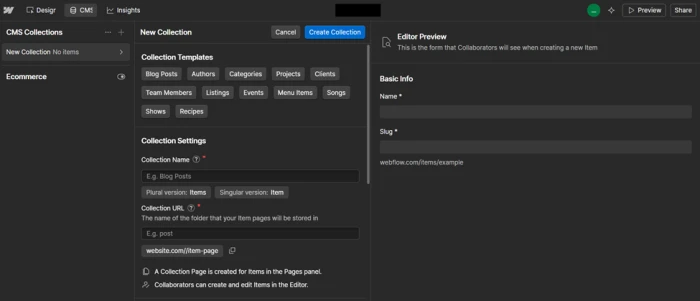
That distinction shows up immediately. Webflow’s generator produced a reasonable draft, but the value arrived afterwards, in a CMS that handles 20,000 items and 40 collections on its Premium plan. My four-page clinic brief did not stress that at all. A clinic with six locations, a practitioner directory, a treatment library, and a blog would stress every other tool on this list and barely trouble Webflow.
There is a trap in the pricing that catches people constantly, so read this twice: the Basic plan has no CMS. None. If your site has a blog or any repeating content type, Basic is not an option regardless of how few pages you have, and your real entry price is $25 a month rather than $15.
Pricing, verified on webflow.com/pricing:
• Starter: free. A webflow.io subdomain, 2 static pages, 1 GB bandwidth, and 50 form submissions in total.
• Basic: $15 a month on yearly billing. Custom domain, 300 static pages, 10 GB bandwidth, unlimited form submissions. No CMS.
• Premium: $25 a month on yearly billing. Adds the CMS with 20,000 items and 40 collections, plus site search and code components.
• Team: $2,500 a month on an annual contract, bundling a workspace, localisation, publishing workflows, and answer-engine optimisation agents.
Workspace plans sit on top of site plans and are billed separately. The free Starter workspace includes 200 AI credits a month, Core is $19 a month for 300, and Growth is $49 a month for 400. Code export requires a paid workspace. Extra seats run $39 a month for a full seat and $15 for a limited one, which is how a $25 site quietly becomes a $100 bill for a team of three.
What changed in 2026: on 13 May, Webflow merged its old CMS and Business plans into the single Premium tier. Half the Webflow pricing guides still ranking on Google describe plans that were retired three months ago.
One caveat on the code export, taken from Webflow’s own documentation: dynamic CMS content has to be exported collection by collection, and forms stop working once the site leaves Webflow hosting. It is a real exit, but not a frictionless one.
4. Durable: best for getting a service business online today
Durable was the fastest to something live by a wide margin, and it has the lowest ceiling of anything here. Both of those facts come from the same design decision.
Durable does not ask you to build a website so much as describe your business. It returns a finished site with a CRM, a booking calendar, a blog agent, and an automated lead-reply agent attached. For a sole-trader physiotherapist with no design opinions and no patience, that is close to ideal. The generated site was plainer than Framer’s and better organised than I expected, and the SEO fundamentals were all present: structured data, an auto-generated sitemap, tagged headings, and an llms.txt file for AI assistants, which is an unusually current touch.
Then you hit the wall. Durable states plainly in its own FAQ that it does not offer meaningful HTML customisation, because it is built as a no-code product. There is no code export and no way to move the site. Everything is metered: images per month, AI chat messages, blog posts, automated lead replies.
Pricing, verified on durable.com/pricing. Note that Durable renamed its tiers, and almost every list currently ranking for this keyword still quotes plan names that Durable no longer uses:
• Free: $0. A .durable.site subdomain, 5 AI images a month, 10 AI chat messages a month, and a CRM capped at 10 customers.
• Launch: $25 a month, or $22 on yearly billing. Free custom domain up to $20 in value, removes Durable branding, 10 blog posts a month, 50 images, 1,000 AI chat messages, 20 automated lead replies, unlimited bookings with calendar sync.
• Grow: $49 a month, or $41 on yearly billing. Unlimited team members, 32 blog posts a month, 500 images, unlimited AI chat, 100 lead replies, daily AI search ranking refresh, and a one-to-one onboarding call.
Yearly billing saves 15%. Every plan includes SEO tooling, secure hosting, unlimited traffic, and the CRM.
Durable is the right answer for a specific person: someone whose website is a formality and whose actual problem is getting booked and getting paid. It is the wrong answer for anyone who will care about the design in six months.
5. Lovable: best when your website is actually an application
Ask Lovable for a website and you get a web application that happens to have a homepage.
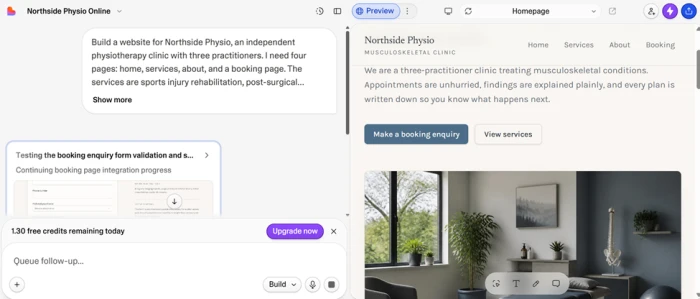
This is the moment the three-category split stopped being theoretical for me. My brief asked for a booking enquiry form. Lovable produced a working booking system with a database behind it. Nobody asked for that, and for a clinic that already uses practice-management software it is duplication. For a founder whose idea genuinely needs accounts and stored records, it is the entire point.
Lovable’s credit model is the thing to understand before you subscribe, and its documentation is refreshingly specific about it. Editing a button style costs about 0.50 credits. Removing a footer component costs about 0.90. Adding authentication with sign-up and login costs around 1.20. Generating a landing page with images and multiple sections runs about 2.00. Plan mode, where you think through an approach without changing code, is a flat 1 credit per message.
Pricing, verified on lovable.dev/pricing and Lovable’s documentation:
• Free: $0. Five build credits a day, capped at 30 per calendar month. In practice you get credits for the first six days of the month, then nothing until the next one.
• Pro: $25 a month for the base 100-credit tier. Daily credits continue with no monthly cap, and top-ups cost $15 per 50 credits.
• Business: $50 a month. Adds single sign-on and governance controls. Top-ups are $30 per 50 credits.
• Enterprise: custom pricing.
Two details from Lovable’s own docs that rarely make it into comparison articles. Unused monthly plan credits roll over while your subscription stays active, which softens the metering considerably. And if your balance reaches zero, your published site stays live and keeps serving pages, but building stops and any backend services your app depends on will pause. A brochure site survives an empty balance. An app with a database does not.
You can export to GitHub at any point, so a project that outgrows the builder is portable. That puts Lovable in the same exit-friendly group as Webflow and Replit, and I weigh those three against each other in the head-to-head table.
6. Replit: best for technical builders who want the whole repository
Replit gives you the most control and the most rope.
Where Lovable hands you a generated application in a managed environment, Replit hands you a development environment with an agent working inside it. You see the file tree, the terminal, the database, and the deployment settings. For someone who can read code, that visibility is the reason to choose it: when the agent makes a mess, you can go and look at what it did instead of prompting your way around the problem.
For my clinic brief this was overkill, and I want to be direct about that rather than pretend otherwise. A four-page marketing site does not need a repository and a Postgres instance. If you are not going to open the code, the control Replit offers is a cost rather than a benefit.
Pricing, verified on replit.com/pricing:
• Starter: free. Daily agent credits and the built-in database, with one published project.
• Core: $25 a month, or $20 billed annually. Two parallel agents, $25 a month toward premium models, unlimited workspaces, and it removes the "Made with Replit" badge.
• Pro: $100 a month, or $95 billed annually. Ten parallel agents, $100 in monthly credits, up to 15 collaborators, 50 viewers, and database rollback up to 28 days.
• Enterprise: custom, adding single sign-on and single-tenant environments.
Replit calls its model effort-based pricing, which is a polite way of saying the subscription is a floor rather than a ceiling. Your bill moves with how much work the agent does. Set a spending limit on day one.
What changed in 2026: Replit retired the old per-seat Teams plan in February and replaced it with Pro, a flat $100 a month covering up to 15 builders. For a small team that was a substantial price cut.
Head to head: which one wins on what
Six tools, one winner each. If a tool wins nothing, it should not be on the list.
| What you are optimising for | Winner | Why it wins |
|---|---|---|
| Best design with zero edits | Framer | A real design system underneath the generator, not a template library |
| Fastest to a live URL | Durable | Answers a few business questions and publishes a complete site |
| Largest content operation | Webflow | 20,000 CMS items and 40 collections on Premium |
| Cheapest paid entry point | Framer | $10 a month on Basic, yearly billing |
| Business tools included | Wix | Payments, bookings, email marketing, and analytics from Core at $29 |
| Leaving without a rebuild | Webflow | HTML and CSS export on any paid workspace, no attribution required |
| Logins and stored data | Lovable | Generates authentication and a database from the prompt |
| Seeing exactly what the AI did | Replit | Full file tree, terminal, database, and repository access |
| Most predictable monthly bill | Wix | Flat plan pricing with no credit meter on the AI features |
That last row deserves more attention than it usually gets. Wix charges a flat amount every month, and Webflow is close behind it. Framer meters AI credits, and so do Lovable and Replit. A heavy month of iteration on any of those three produces a bill you did not forecast. If you are budgeting for a client or a business with fixed costs, flat pricing is worth paying slightly more for.
The three comparisons people actually search for
These questions come up constantly in the search results around this topic, so here are short direct answers rather than making you hunt for them.
Wix vs Lovable
These are not competitors, despite being compared constantly. Wix builds a website with a business system attached and charges a flat monthly fee. Lovable builds an application with a database and charges by how much you build. Choose Wix if your site is pages plus a contact form and you want payments and bookings handled. Choose Lovable if the thing you are describing has users who log in. If you pick Lovable for a brochure site, you will pay credits to maintain something a $17 Wix plan would have hosted without complaint.
Framer vs Webflow
The closest matchup on this list, since both are design-first tools at nearly identical prices. Framer produces better output faster and has a gentler learning curve. Webflow gives you a much deeper CMS and a genuine export path out. The tipping point is content volume: under roughly 30 pages with a couple of content types, take Framer at $10; a real blog or a large directory pushes you to Webflow Premium at $25, since Webflow Basic has no CMS at all.
Lovable vs Replit
Both generate real applications you can export. Lovable is the better choice for non-developers, because it manages the environment and presents a cleaner interface over the same underlying idea. Replit is the better choice if you can read code, because it shows you the actual repository rather than abstracting it away. Cost structure differs too: Lovable meters credits per message, while Replit gives you a monthly credit allowance against model usage and bills for the overage.
Are the free plans good enough?
All six have a free tier. Only one of them will host a real business website for $0, and the reason is the same across the other five: the custom domain sits behind the paywall.
| Builder | What the free plan gives you | The catch |
|---|---|---|
| Framer | Publish to a Framer subdomain, 1 GB bandwidth, 500 credits to try the agents | No custom domain on any free project |
| Wix | Full editor and hosting, with no time limit | Wix branding on your site and a Wix subdomain |
| Webflow | A webflow.io subdomain and the full Designer to learn in | 2 static pages and 50 form submissions in total |
| Durable | A .durable.site site plus a CRM for 10 customers | 5 images and 10 AI chat messages a month |
| Lovable | 5 build credits a day and unlimited collaborators | The 30-credit monthly cap lands around day six |
| Replit | Daily agent credits, the built-in database, one published project | One live project at a time |
Wix is the only one of the six where a small business could realistically operate on the free plan, and it will cost you credibility, because the Wix branding is visible to every visitor. For a clinic taking bookings, that is a poor trade for $17 a month.
Where the free tiers genuinely earn their place is evaluation. Every one of these will let you run the brief from earlier in this article and see the output before you pay anything, which is exactly how I would spend an evening before committing to any of them.
What none of these tools did well
Six generated sites, and the same four gaps in all of them.
The copy was the weakest part every single time. Each tool produced grammatical, plausible, entirely forgettable text about caring practitioners and personalised treatment plans. None of it said anything a competing clinic could not also claim. A good-looking site with generic copy converts worse than a plain site with specific copy, and that gap is still yours to close by hand.
Accessibility was inconsistent. Colour contrast on generated buttons frequently sat below the threshold that people with low vision need, and image alt text was either absent or a description of the stock photo rather than its purpose. For a healthcare business this matters more than usual, since a meaningful share of physiotherapy patients have some impairment.
None of the tools asked what the site was for. Every one of them assumed the goal was a nice-looking clinic website. Not one asked whether the priority was booking volume, and the layouts reflected that: the booking call to action was treated as one section among several rather than the thing the entire page should be driving toward.
And integrations remained manual. Connecting a real practice-management system, a payment processor, an existing patient database, or an insurance billing tool was left entirely to me in every case, including the two app builders that generated their own database schemas.
How to choose in 60 seconds
Work down this list and stop at the first line that describes you.
• Your site needs accounts or saved records, and you cannot read code: Lovable, Pro at $25 a month.
• Same as above, but you can read code and want the repository: Replit, Core at $20 a month on yearly billing.
• You want the site live today and you care more about getting booked than getting admired: Durable, Launch at $22 a month on yearly billing.
• You need payments, bookings, email marketing, and analytics in one place with a predictable bill: Wix, Core at $29 a month.
• You will publish content regularly, or you want the option to export and leave: Webflow, Premium at $25 a month.
• You want the best-looking site for the least money and you will stay under 30 pages: Framer, Basic at $10 a month.
Before you pay any of them, do this. Build one page on the free tier, publish it, then open it on your own phone on mobile data and run the URL through Google PageSpeed Insights. Generated sites tend to carry heavy hero images and unused scripts, and the difference between these six on a real phone is larger than the difference in their monthly prices. The tool that survives that test on your actual content is the one worth your card details.
Comments
Join the discussion and share your perspective.